
diados
Extension of the Day

diados

5.0 FREE
  • Screenshot 1

Description

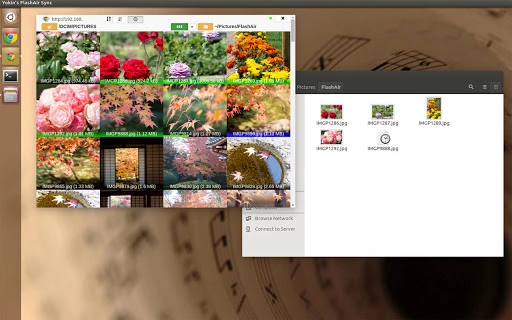
Chrome App utility for WiFi capable SD memory card FlashAir(TM) TOSHIBA.[TOSHIBA FlashAir(TM)](http://www.toshiba.co.jp/p-media/flashair/)- Runs on multiplatforms Windows, Linux and Mac(OSX) where Chrome is on.- Modern responsive and dynamic thumbnail experience.- Connection indicator shows currenct connectivity to FlashAir host device.- Realtime file transfer from SD card to your local drive.###Tested EnvironmentFlashAir- W-03OS- Windows 8.1- Linux (Ubuntu 15)- Mac OS X- Chrome OSVersion Histroy-------------- 0.9.5 Compatible with FlashAir firmware version 1 (2015.7.29)- 0.9.2 First release (2015.6.14)License-------------(c) 2015 Yokinsoft Jake.Y.Yoshimura http://www.yo-ki.comAll rights reservedSource code is open under GPLv3 license at GitHubhttps://github.com/JakeJP/FlashAirJsApps

Guides & Tutorials for Yokin's FlashAir Sync App for Chrome

How to install Yokin's FlashAir Sync App for Chrome
  1. Click the Preview / Download button above.
  2. Once redirected, accept the terms and click Install.
  3. Wait for the Yokin's FlashAir Sync App for Chrome download to finish on your device.
How to use Yokin's FlashAir Sync App for Chrome

This software is primarily used for its core features described above. Open the app after installation to explore its capabilities.

User Reviews for Yokin's FlashAir Sync App for Chrome 0

    No reviews found

Similar Apps


